
A tracking number pool is a collection of unique phone numbers that rotate across website visitors, so Nimbata can tie each call back to the session, source, and campaign that drove it. Read this page before you buy numbers for your website: it explains how swap groups hold pools, and how many numbers you need for each kind of tracking.
Swap groups and pools
Tracking numbers in Nimbata can either live individually or under a group. Groups are known as swap groups. This section explains both levels and answers some related, commonly asked questions.
Swap groups
A swap group is a named collection of tracking numbers that share the same source, call flow, and DNI swap configuration. The group name is what you see as the heading, e.g. “Austin - Google Ads” or “Phoenix - All Sources”.
- The swap group is the unit that the DNI script works with.
- When a visitor arrives from a matching source, the script pulls one number from that group’s pool and displays it to the visitor.
- All numbers in the group are interchangeable for this purpose.
Tracking numbers in a group
- The individual numbers listed under each swap group are the actual phone numbers in that pool.
- Each one can be assigned a call individually or receive calls as part of the group’s pool rotation.
- If you see two numbers under “Austin” and four under “Phoenix”, that means Austin has a pool of two and Phoenix has a pool of four.
- The pool sizes were set based on the expected traffic volume for each location.
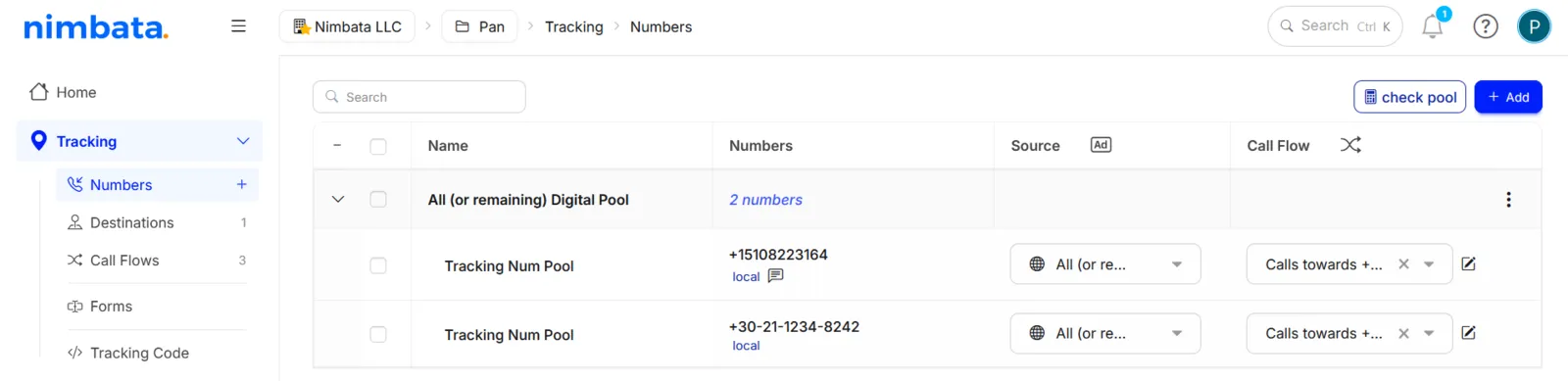
Why multiple numbers under one group?
- A single number can only handle one simultaneous call.
- If two visitors from the same source arrive at the same time, each needs their own unique number to maintain accurate session attribution.
- The pool exists to cover concurrent visitors.
- The larger your peak simultaneous traffic, the more numbers you need in the pool.
Detailed guide: Calculate your pool size
Detailed guide: How many numbers you need
Do you need different numbers for different departments?
Not necessarily. The decision depends on whether you want to measure departments separately.
- If your goal is to route calls to different departments and you do not need separate reporting per department, a single call flow with a Keypad Entry (IVR) action can handle the routing. One pool of tracking numbers, one swap group, one call flow; callers press 1 for Sales and 2 for Support.
- If you want separate call volume reporting, separate conversion tracking, or separate workflow rules per department, then a dedicated swap group per department makes sense.
Detailed guide: Build a keypad menu
Detailed guide: Plan your swap groups
Can you use the same call flow across multiple swap groups?
Yes, you can.
- A call flow can be assigned to multiple swap groups or individual numbers.
- If your clients in Austin and Phoenix have identical routing logic, they can share one call flow.
- Changes to that flow apply everywhere it is assigned.
- If one client needs different routing, create a separate call flow for them.
Detailed guide: Build a call flow
Can you duplicate a call flow to use for another client?
Yes. Rather than rebuilding a call flow from scratch for a new client, you can duplicate an existing project (which carries over the call flow structure) or manually recreate the flow using the same actions.
Detailed guide: Create or duplicate a project
Detailed guide: Set up swap groups
Detailed guide: Tracking numbers: Number types and channels
How many numbers you need
The number of tracking numbers you need depends on the channels, campaigns, and visitor sessions you want to track. There are four tracking setups, each requiring a different amount.
1. Offline sources
TV, radio, print, billboards, etc.
- Use 1 tracking number per offline medium.
- Each number lets you count how many calls that medium generated.
2. Online sources: static tracking
Google My Business, Google Ads extensions, listings, landing pages
- Use 1 tracking number per source or listing.
- This tells you how many calls each placement drives.
3. Online sources: number swapping
Direct, organic, PPC, newsletters, referrers, social media
- Use 1 tracking number per online source.
- With dynamic number swapping, each visitor sees a different number depending on how they arrived.
4. Visitor tracking: number pools
The most advanced setup.
- It combines the visitor journey with the call using Nimbata’s DNI script.
- Use this when you want to send conversions to Google Ads, Microsoft Ads, or Facebook.
Single pool for all visitors: one pool tracks all website visitors and attributes each call back to its source, medium, or campaign.
Multiple pools per channel: create a separate pool for each channel you want visitor-level insights on. Visitors from other sources continue to see your regular number.
To calculate the optimal pool size for your setup, see Calculate your pool size. For Google Ads, see Numbers for Google Ads.
Numbers for Google Ads
The number of tracking numbers you need for Google Ads depends on what you’re tracking and how deep you want your attribution to go.
Tracking calls from call extensions
Use static tracking numbers, one for each level of attribution you want:
- Account level: 1 number total
- Campaign level: 1 number per campaign
- Ad group level: 1 number per ad group
Tip
If you’ve already set up DNI to track all sources, you don’t need additional numbers. Your pool already covers Google Ads traffic; just connect the integration and you’re good to go.
Tracking only calls from Google Ads
To calculate exactly how many numbers you need for a Google Ads-only pool:
Open the pool calculator
- Go to Tracking > Numbers.
- Click the + Add button.
- Select A specific online channel.
- Then, select Online paid.
- Click Next.
Get your recommended pool size
Leave the channel settings as default, click Next, then click Get from Google. Nimbata pulls your traffic data and calculates the recommended pool size.
Apply the recommendation and finish
Find the recommended number count under the Paid Search row, click Use, then click Finish.
You now know exactly how many numbers you need for Google Ads conversion tracking.
Detailed guide: Calculate your pool size
Detailed guide: Connect Google Ads
Calculate your pool size
The right pool size depends on your peak traffic and average session duration.
The formula
Pool size = [Peak hourly visitors] / [60 / average session duration] × 1.3
Example: 200 peak visitors, 3-minute average session: 200 / (60/3) × 1.3 = 13 numbers
Method 1: use the Nimbata pool estimator
The easiest option. Nimbata calculates the pool size for you when you add tracking numbers.
Start adding numbers
Go to Tracking > Numbers and click + Add.
Open the calculator
When prompted, click Get from calculator.
Enter your traffic
Enter your peak hourly visitors, then click Use pool.
Method 2: use a GA4 table report
Build the report
In GA4, go to Explore > Blank. Set:
- Dimensions to Date + Hour.
- Metrics to Sessions and Average Session Duration.
- Technique to Free form.
- Visualization to Table.
Find your peak
Sort by Sessions descending to find your peak.
Apply the formula
Apply the peak Sessions value and Average Session Duration to the formula above.
Method 3: connect GA4 directly
When adding tracking numbers:
Click Get from Google
Click Get from Google.
Grant access
Grant Nimbata access to your GA4 account.
Select your property
Select your GA4 property. Nimbata calculates the recommended pool automatically.
Apply your pool size when setting up or expanding your tracking numbers.
Detailed guide: How many numbers you need
Detailed guide: Tracking numbers: Number types and channels
Numbers across several swap groups
If your website uses more than one swap group (for example, a default number on most pages and location-specific numbers on regional landing pages), you may wonder what happens to those numbers as a single visitor moves between pages. Are old numbers released? Replaced? Held onto? This section walks through the exact behavior.
Tracking number behavior
All numbers assigned to a visitor stay with them while they browse. Numbers are not released or replaced when the visitor moves to another page of your site, and Nimbata remembers them in the visitor’s browser for the Max storage days period (21 days by default). Each new swap group the visitor encounters adds another number to their session.
A typical multi-location setup
Many businesses with multiple physical locations configure their site like this:
- Default swap group (
nimbata_number_1): used on the homepage and other non-location pages - Amsterdam swap group (
nimbata_number_2): used on the Amsterdam landing page - Rotterdam swap group (
nimbata_number_3): used on the Rotterdam landing page - …and so on, one swap group per location
Each location page uses its own swap group class for DNI so that visitors see a number local to the region they are browsing.
What happens as a visitor browses
Imagine a single visitor moving through three pages in one session.
Visitor lands on the homepage
Nimbata assigns a tracking number from your Default pool (
nimbata_number_1) and remembers it in the visitor’s browser.Visitor navigates to the Amsterdam page
Nimbata detects a new swap group (
nimbata_number_2) on this page. It assigns a number from the Amsterdam pool and ties it to the same session. The Default number is not released; it stays attached to the session in case the visitor returns to a non-location page.Visitor navigates to the Rotterdam page
Nimbata detects another swap group (
nimbata_number_3), assigns a number from the Rotterdam pool, and adds it to the session. Again, the previously assigned numbers stay attached.Visitor goes back to the Amsterdam page
The Amsterdam pool number that was already assigned in step 2 is displayed again. Nimbata does not re-assign a new Amsterdam number; it reuses the one already tied to this session.
By the end of this browsing journey, the visitor’s browser remembers three tracking numbers: one from Default, one from Amsterdam, and one from Rotterdam. None of them is reserved for this visitor; other visitors can be shown the same numbers.
Why numbers aren’t released when a visitor changes page
Releasing a number the moment a visitor leaves a page would break attribution. A common visitor pattern looks like this:
- Visitor lands on the Amsterdam page
- Browses the homepage to learn more about the company
- Returns to the Amsterdam page
- Calls the number shown
If Nimbata released the Amsterdam number in step 2, the visitor might be shown a different number in step 3, and the eventual call would not be attributed to the original Amsterdam visit. Because the visitor’s browser remembers the number, the visitor sees the same Amsterdam number in step 3, and the call stays tied to the original Amsterdam visit.
What this means for pool sizing
A pool never runs out: Nimbata serves its numbers in rotation (round-robin) and does not reserve a number for one visitor, so a visitor who sees several swap groups does not use up numbers that others need. If you are unsure how many numbers each pool needs, you can use the pool calculator inside Nimbata, or get in touch with the team and we will help you size it correctly.
Detailed guide: Set up DNI step by step
Detailed guide: Swap target formatting rules
Detailed guide: Plan your swap groups