
DNI can show numbers that fit where the visitor is or which branch they are looking at. Geo-Swap picks a number with a local area code from the visitor’s location, and the multi-location setting lets every branch project share one tracking script.
Geo-Swap
Geo-Swap shows each website visitor a tracking number with a local area code, based on the visitor’s location. It is a feature included in every plan that supports DNI (Dynamic Number Insertion).
Say, for example, someone from Fort Worth, TX lands on your page. You would want them to see a relevant area code (like 817, Tarrant County). With Geo-Swap, you can.
How it works
Each visitor landing on your website is located by IP address (state-wide) and shown a number with an area code within 50 miles.
What happens if no local number is available
Initially, it falls back to a number from the same state or province.
If no such number exists in your setup, it falls back to a number without a local area code (for example, a toll-free number).
If none of the above is available, it falls back to any number in the pool.
Returning visitors keep seeing the same number until your Max storage days period ends.
Note
This feature applies for Canada, the USA, UK and Australia.
Prerequisites
- Local numbers for the areas you want to cover
- Your DNI is already installed on the page
Detailed guide: Set up DNI step by step
Turn on Geo-Swap
Toggle Geo-Swap on
Having met the prerequisites, head to Tracking > Tracking Code.
Locate the Geo-Swap button (in Number Swapping, under Swap Type) and toggle it on.
Save and re-publish
Save and re-publish your script.
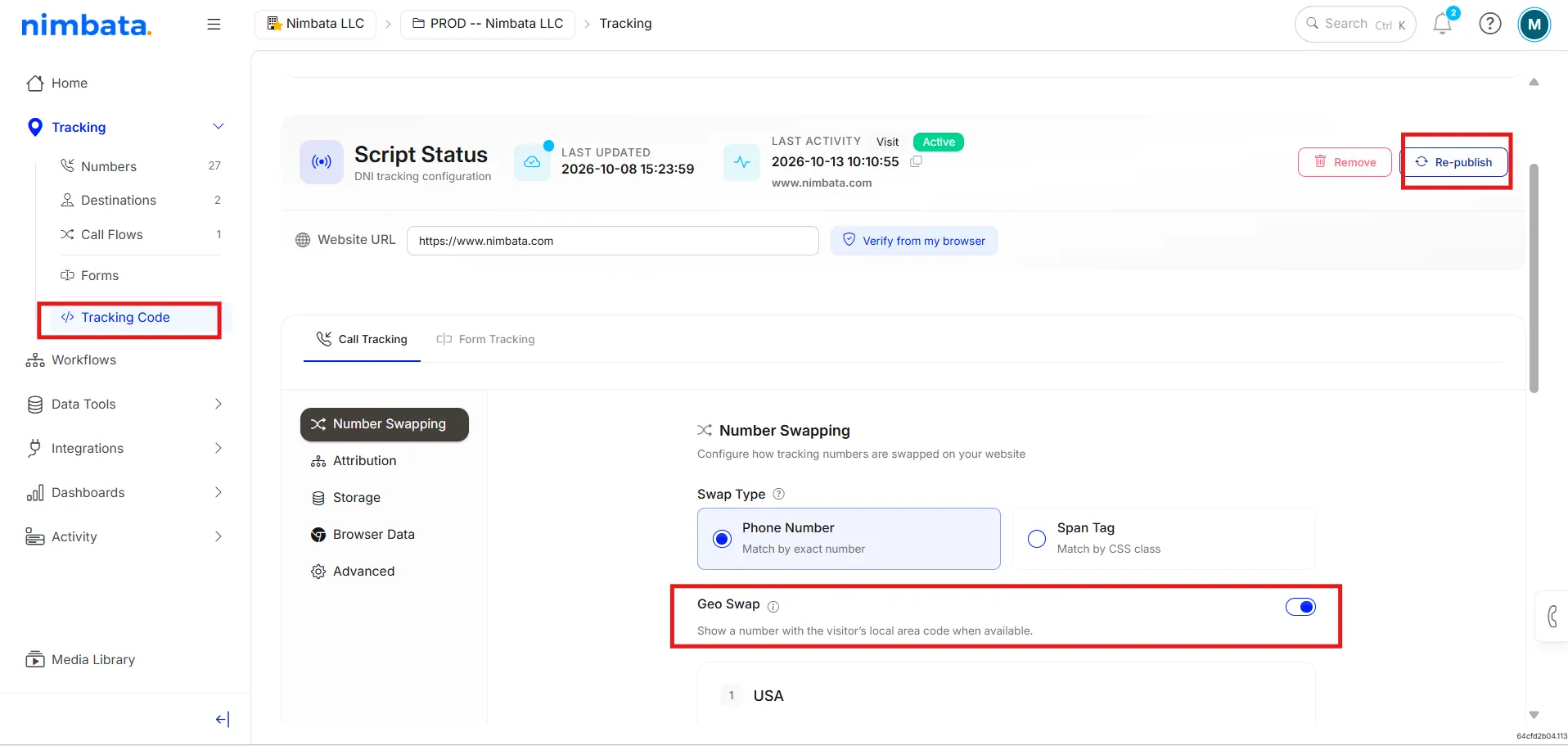
🎉 You are set! Geo-Swap is now live in your project.
Multi-location businesses
If your business runs multiple locations, franchises, or dealers under one website, you can track calls for all of them with a single tracking script. Each location keeps its own phone numbers and its own dashboard; you only install Nimbata once.
Who this is for
This is built for brands that show all their locations under one domain, each on its own page, for example:
- yourbrand.com/new-york
- yourbrand.com/new-jersey
- yourbrand.com/pittsburgh
Franchises, dealer networks, and multi-branch service businesses all fit this pattern. If that’s you, this feature means you don’t add a separate script for every location.
What it does
Once enabled, all of your location projects share one tracking script. Nimbata detects which location page a visitor is on and automatically swaps in the correct phone number for that branch. The visitor on your New Jersey page sees the New Jersey numbers; the visitor on your Pittsburgh page sees the Pittsburgh numbers, from the same single line of code.
Turn it on
Open your organization settings
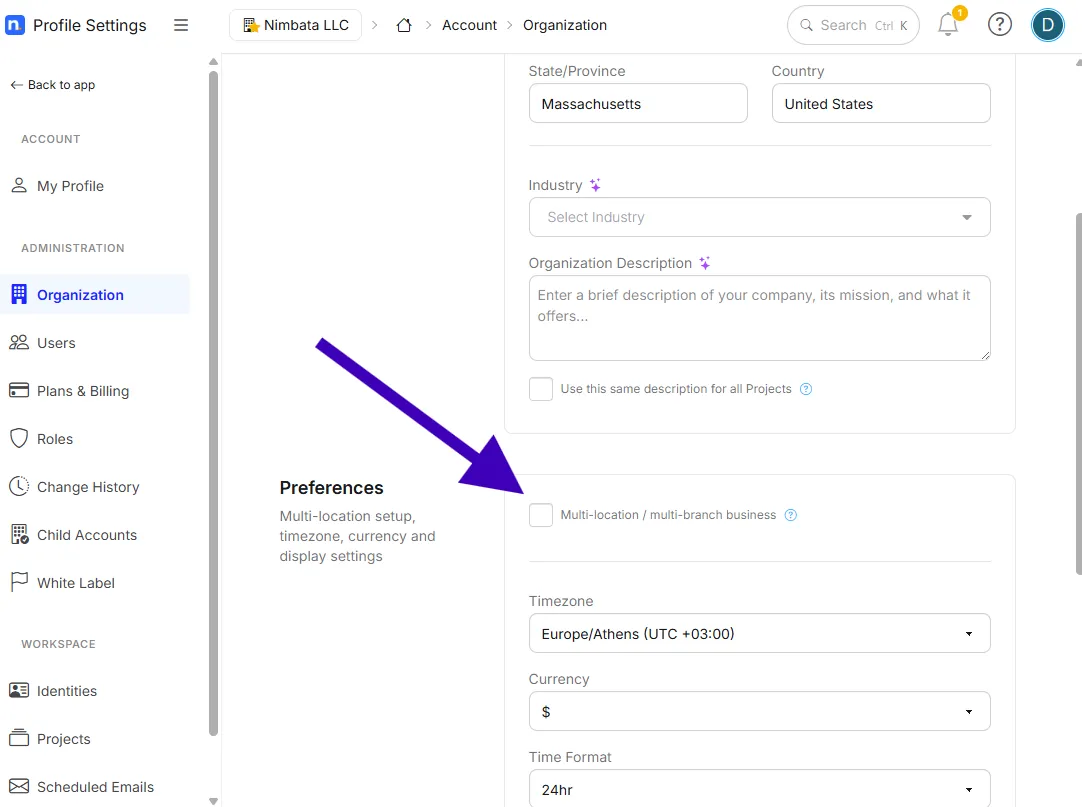
Go to Account > Organization (https://app.nimbata.com/account/organization).
Find Preferences
Find the Preferences section.
Tick the multi-location box
Tick the box labelled Multi-location / multi-branch business.
That’s the whole setup on your side. Your location projects will now share one script instead of needing one each.
Getting your locations set up
Option 1: Set it up yourself
Each location should be set up as a unique project. Each project should have its own set of tracking numbers, destinations, call flows, and so on. To learn how to add projects to your account, see Create or duplicate a project.
Option 2: Set it up for me
To get started, share a spreadsheet with one row per location, including:
- Location / franchisee / dealer name
- Destination number: where calls should ring through
- Sources you want to track (for example, Google, paid ads, organic)
- Which number to swap on that location’s page
- Any integrations you’d like connected
- How many numbers to add per location, and the preferred area code for those numbers
Send that over and we’ll provision the numbers, wire up the swapping, and connect your integrations. Your setup time is effectively zero, and tracking is live from day one. If you already have numbers you’d like to keep, we can also port them in to Nimbata for you (see Number porting).
What you get
- A dashboard for each location, so every franchisee or branch sees their own performance.
- A unified dashboard for admins and marketing leaders covering the whole network.
- Scoped access: each location sees only its own data; HQ sees everything.
- The ability to compare locations side by side on call volume and quality.
- Full visibility into every phone interaction across your entire network.
FAQ
Do I need a separate script for each location?
No. That’s the point of this feature: one script covers every location under your domain.
Will each location still get its own numbers?
Yes. Every location is its own project with its own numbers; the shared script simply knows which number to show on which page.
Can each franchisee see the other locations’ data?
No. Access is scoped so each location sees only its own calls. Admins and marketing leaders get the network-wide view.
Can you move our existing numbers over?
Yes. We can port your current numbers in to Nimbata for you as part of setup.