
UTM parameters are labels attached to URLs that tell Nimbata (and analytics tools) how a visitor arrived at your website. This page explains how Nimbata fills the UTM values on your calls, and how to tag your Google Ads campaigns and Facebook ads.
How Nimbata fills UTM values
In Nimbata, UTM values appear in call reports, webhook payloads, and integration data. In many cases these values are derived by Nimbata based on traffic source and tracking configuration; they are not always passed directly from the URL. How UTM values are populated depends on your tracking setup: session-based, source-level, or static.
Session-based tracking
Session-based tracking applies when a call can be linked to a website visit via Dynamic Number Insertion (DNI). UTM values reflect the visit that triggered the number swap, not the call itself.
| VISIT SOURCE | UTM_SOURCE | UTM_MEDIUM | UTM_CAMPAIGN |
|---|---|---|---|
| Direct | (direct) | (none) | (none) |
| Organic | [organic_provider_name] | organic | (none) |
| Google Paid | cpc | [utm_campaign] | |
| Bing Paid | bing | cpc | [utm_campaign] |
| Social Media | [social_media_provider_name] | [utm_medium] | [utm_campaign] |
| Social Media (ref) | [social_media_provider_domain] | referral | (none) |
| Referral | [website_domain] | referral | (none) |
| Custom Parameters | [utm_source] | [utm_medium] | [utm_campaign] |
| [utm_campaign] |
[organic_provider_name]and[social_media_provider_name]are derived from the referring domain detected during the visit.- If no campaign parameter is present,
utm_campaignappears as(none). - Custom UTM parameters only populate if they exist on the landing page URL at the time of the visit.
Tip
These values only appear if you’re using session-based call tracking with dynamic number insertion (DNI) enabled and correctly installed. If DNI is missing, blocked, or not firing, calls fall back to source-level tracking.
Source-level tracking
Source-level tracking applies when calls cannot be linked to a website visit, for example when DNI is not installed or a call is placed from outside a tracked session. UTM values are inferred from the tracking number’s configuration.
| VISIT SOURCE | UTM_SOURCE | UTM_MEDIUM | UTM_CAMPAIGN |
|---|---|---|---|
| All or remaining digital | (not set) | [Friendly Name] | (none) |
| Online Paid | paid | cpc | (none) |
| Social Media | social | [social_media_source] | (none) |
| Organic | organic | organic | (none) |
| Direct | (direct) | (none) | (none) |
| Referral | referral | referral | (none) |
| (none) |
(not set)means the value could not be derived from visit or campaign data.(none)means the value is intentionally empty based on tracking logic.- The Friendly Name is the label you assign in Nimbata and is often used to describe the channel, campaign group, or offline source associated with the tracking number.
Static-based tracking
Static-based tracking is used for calls that are not associated with a website visit, such as offline or fixed-placement campaigns.
| VISIT SOURCE | UTM_SOURCE | UTM_MEDIUM | UTM_CAMPAIGN |
|---|---|---|---|
| Impression | Impression | [Friendly Name] | (none) |
| Offline | Offline | [Friendly Name] | (none) |
| Other | Other | [Friendly Name] | (none) |
| TV | TV | [Friendly Name] | (none) |
| Radio | Radio | [Friendly Name] | (none) |
| [Friendly Name] | (none) | ||
| Google My Business* | GMB | [Friendly Name] | (none) |
| Google Ad Extension* | GAE | [Friendly Name] | (none) |
Note
Static-based UTMs are not tied to user sessions or clicks and should not be interpreted as visit-level attribution. Labels such as GMB and GAE are standardized identifiers used by Nimbata and may not match Google’s naming conventions exactly in other analytics platforms.
Tip
You can customize the Friendly Name for each static source when setting up tracking numbers.
Detailed guide: Assign UTM values to a number
Detailed guide: Capture custom URL parameters
Tag Google Ads campaigns
UTM tags tell Nimbata (and Google Analytics) which Google Ads campaign, medium, and source drove a visitor to your site and, when they call, which campaign gets credit. There are two complementary approaches: auto-tagging and manual UTM parameters. Using both together gives you the most complete picture.
Auto-tagging and manual UTMs
Auto-tagging automatically appends a GCLID to every ad click URL, enabling Google Ads and Google Analytics to communicate accurately. It’s the simplest setup and works well for most campaigns.
Manual UTM parameters let you define specific values for source, medium, campaign, and more. They’re especially useful when you need granular control over how traffic is labelled in Nimbata reports or when working with larger, multi-campaign accounts.
The best practice is to use both: auto-tagging for Google’s own attribution, and UTMs for your Nimbata and GA4 reports.
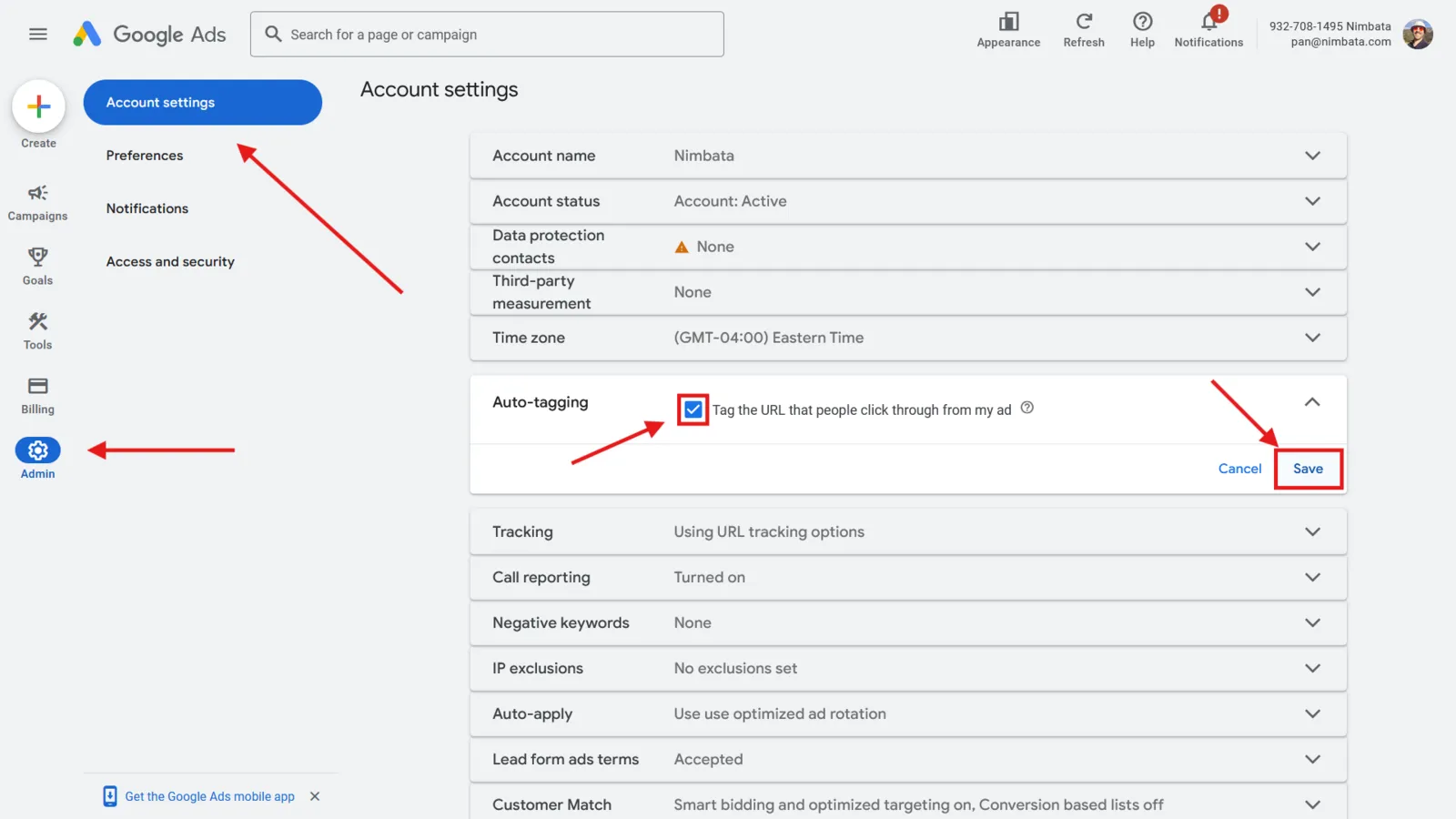
Turn on auto-tagging
- In your Google Ads account, go to Admin.
- Click Account settings.
- Find Auto-tagging in the menu.
- Check the box Tag the URL that people click through from my ad.
- Click Save.
Add UTM tags manually
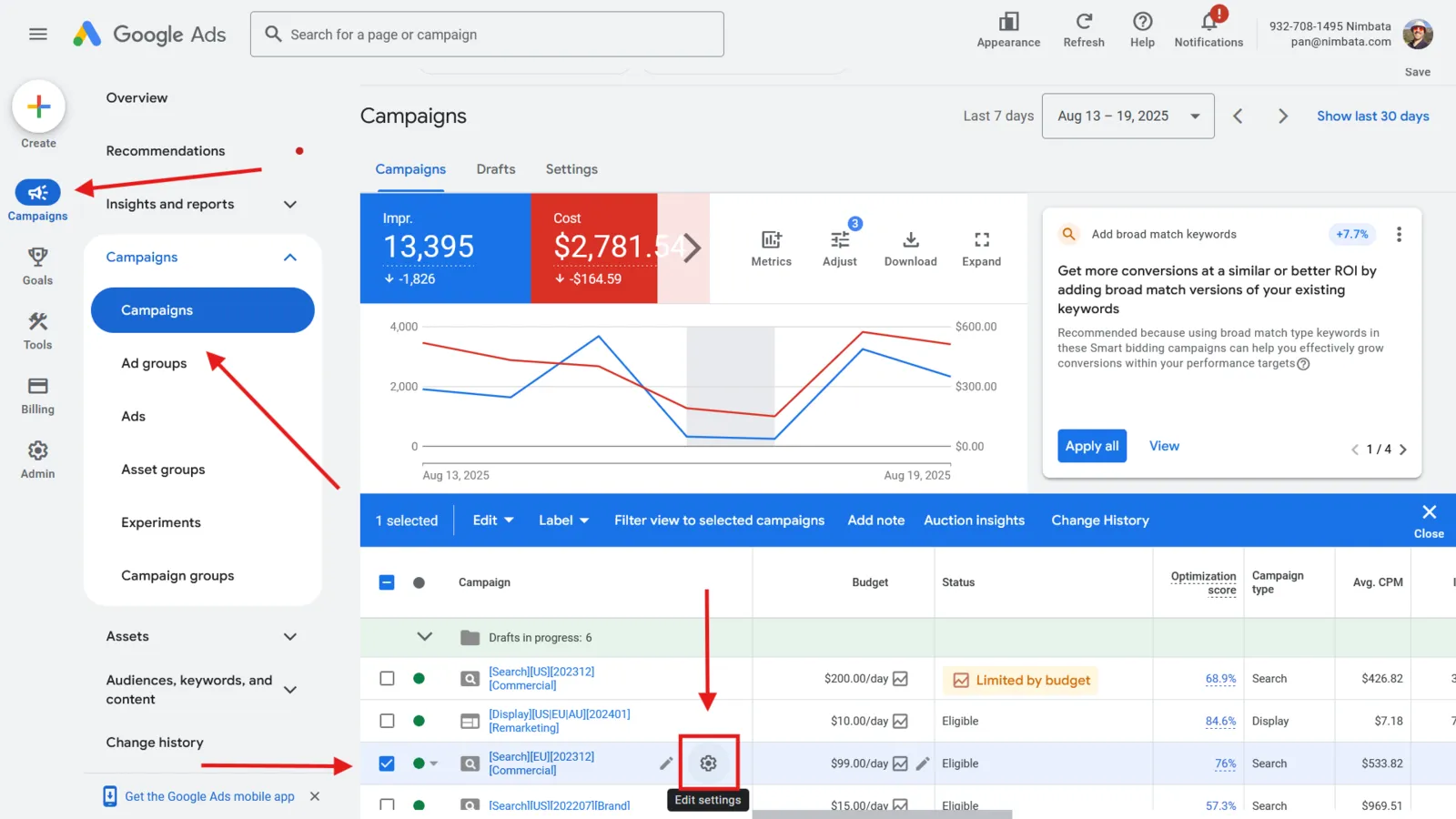
Open the campaign you want to tag
- In Google Ads, go to Campaigns > Campaigns in the left-hand menu.
- Click the campaign you want to add UTM tracking to.
- Click Edit settings.
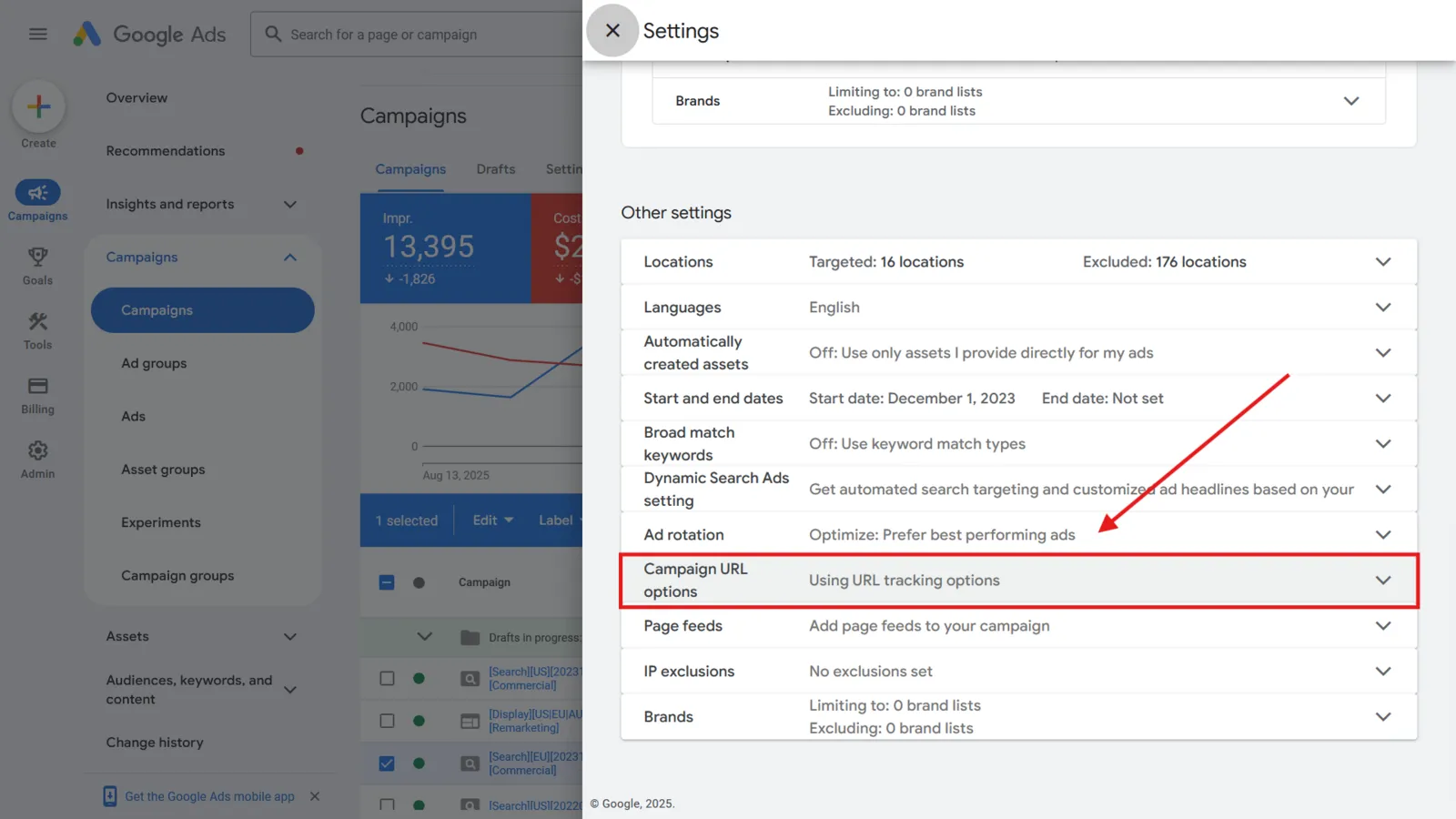
Open the campaign URL options
- Scroll to the bottom of the campaign settings to the Other settings section.
- Click Campaign URL options.
Build your UTM string
Structure your parameters before entering them. The five standard parameters are:
- utm_source: the traffic origin (for example
google) - utm_medium: the channel type (for example
cpc) - utm_campaign: the specific campaign (for example
summer-sale) - utm_term (optional): the paid keyword that triggered the ad
- utm_content (optional): differentiates between ads or links within the same campaign
Tip
A correctly structured URL looks like this: https://www.yoursite.com/?utm_source=google&utm_medium=cpc&utm_campaign=summer-sale
- utm_source: the traffic origin (for example
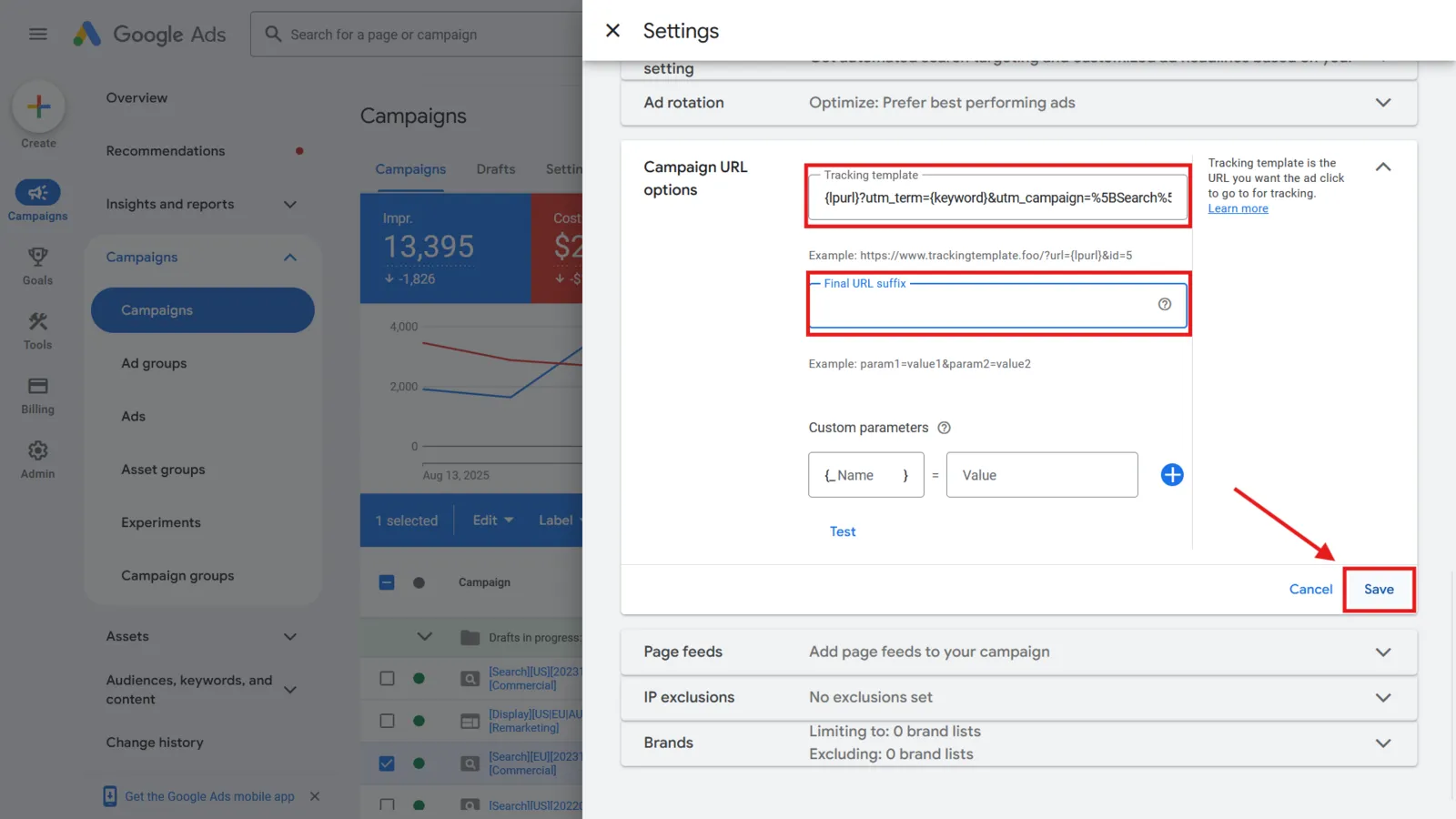
Add the URLs to the campaign
- In the Tracking template field, enter
{lpurl}followed by your UTM parameters, for example{lpurl}?utm_source=google&utm_medium=cpc&utm_campaign=summer-sale. Google Ads replaces{lpurl}with the ad’s landing page. - Or, in the Final URL suffix field, enter only the parameters, without the URL or the
?, for exampleutm_source=google&utm_medium=cpc&utm_campaign=summer-sale. Google Ads adds them to the end of the landing page URL. - Click Save.
Note
You can apply UTM tags at the ad group level using the same process.
- In the Tracking template field, enter
🎉 Your campaign is now tagged. Nimbata captures these UTM values for any call placed by a visitor who arrived via this campaign.
Detailed guide: How Nimbata fills UTM values
Detailed guide: Assign UTM values to a number
Tag Facebook Ads
Adding UTM tags to your Facebook Ads lets Nimbata attribute calls and form submissions to specific Meta campaigns, ad sets, or ads. Without UTM tags, Facebook traffic may appear in your Nimbata reports as referral or unknown source.
Tip
Keep a consistent naming structure across all your UTM tags. Use lowercase values and the same conventions in every campaign to ensure clean, filterable data in Nimbata reports.
Open the ad you want to tag
- In Facebook Ads Manager, navigate to the campaign, ad set, or ad you want to add UTM tracking to.
Enter your website URL
- Enter the destination URL in the Website URL field.
Open the URL parameter builder
- Scroll to the Tracking section.
- Click Build a URL parameter.
Fill in your UTM parameters
- Set Campaign source (utm_source) to the traffic origin (for example
facebook_ads). - Set Campaign medium (utm_medium) to the channel type (for example
ppc). - Set Campaign name (utm_campaign) to the campaign name (for example
spring-promo). - Set Campaign content (utm_content) to differentiate ad variations (optional).
- Leave Term (utm_term) blank: it is not typically used for Facebook Ads.
You can use Facebook’s dynamic parameters to insert values automatically from your campaign structure (for example,
{{campaign.name}}to auto-populate the campaign name).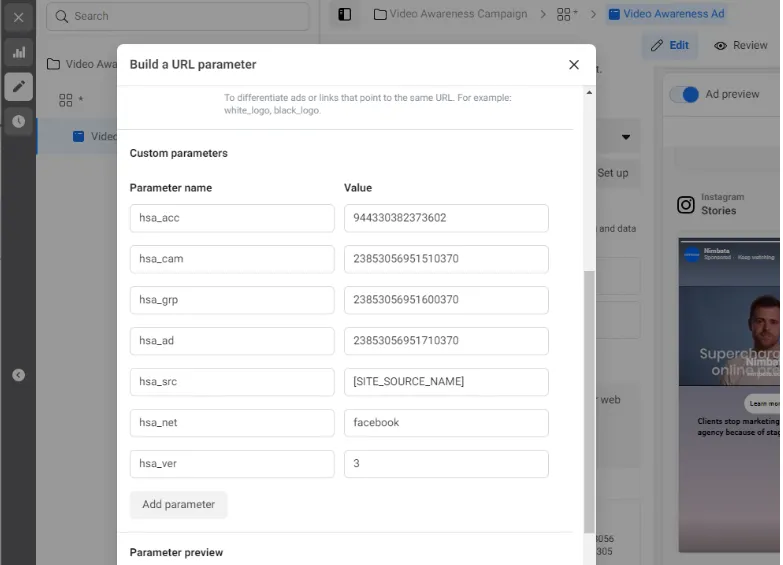
- Set Campaign source (utm_source) to the traffic origin (for example
🎉 Your Facebook ad is now tagged. Nimbata captures these UTM values for any visitor who arrives via this ad and places a call.
Detailed guide: How Nimbata fills UTM values
Detailed guide: Assign UTM values to a number